Pages

Showing posts with label IIS. Show all posts

Saturday, October 25, 2008

0x80070032 - HTTP Error 404.3 - Not Found

If you recently install and run your ASP.Net application on your server (any server like localhost) and get Error Code 0x80070032 as below:

Error Summary

HTTP Error 404.3 - Not Found
The page you are requesting cannot be served because of the extension configuration. If the page is a script, add a handler. If the file should be downloaded, add a MIME map.


Error Code: 0x80070032
Notification: ExecuteRequest
HandlerModule: StaticFile
ModuleRequested URL: http://localhost:80/ets/bob.asp
Physical Path: C:\inetpub\wwwroot\ets\bob.asp
Logon User: AnonymousLogon
Method: AnonymousHandler: StaticFile


How to fix it

On my case, it was because ASP.Net on IIS was not installed.

Open your Windows Features and check if you have following items are installed:
> Internet Information Services
+---> World Wide Web Services
+-------> Application Development Features
+-----------> ASP.Net
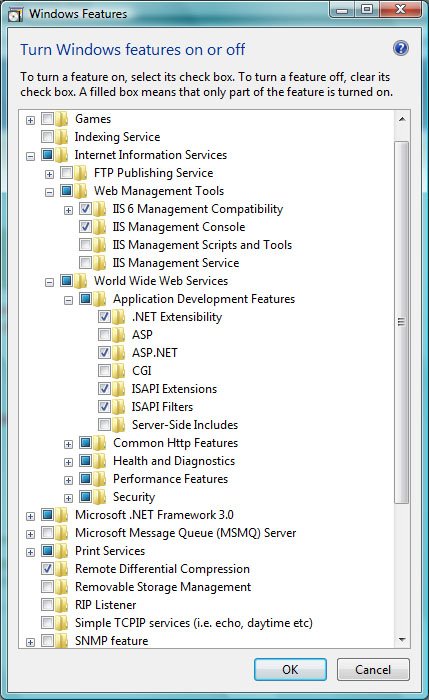
From Gogo Dude

After installing it, your ASP.Net will run promtly.

Sunday, September 28, 2008

System.Web.HttpException: Maximum request length exceeded.

If you recently got following error when calling any method to upload loan package to server:

System.Web.HttpException: Maximum request length exceeded.

This is because the default maximum HTTP request if not set is 4MB (4096). If you want to upload more than that, you must modify element
in section

<snip>
   <system.web>
      ...
      <httpruntime maxrequestlength="[maximum length (ex: 15360 = 15(MB) x 1024]">
         ...
      </httpruntime>
   </system.web>
</snip>


On machine.config if you want all your applications on IIS have the same configuration.
Or on
web.config if you want only the modified application is affected by the new policy.